

ClipRail is a Mac app.

Open this page on your Mac to download it. Or copy the link for later.

https://cliprail.store/download

Interactive demo of ClipRail. It works with mouse, touch or keyboard. Everything here also works in the real app.

Clipboard history for Mac

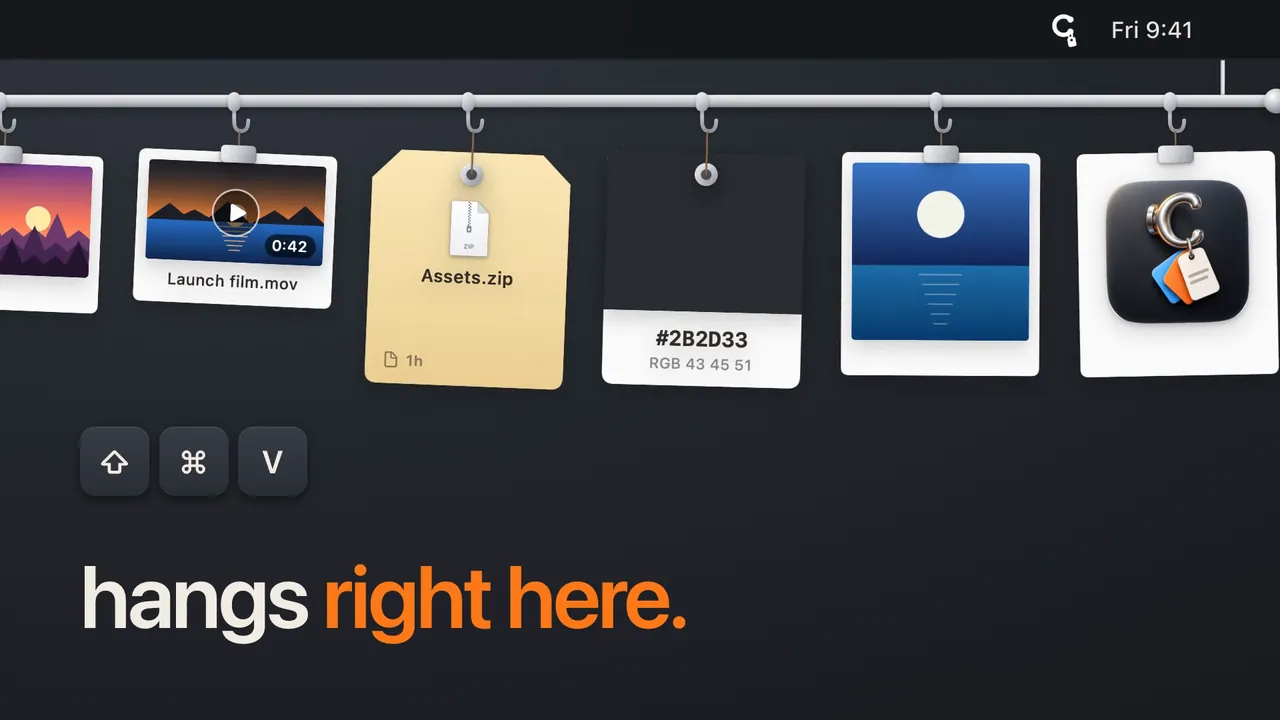
Everything you copy hangs right here.

Every copy hangs as a tag. Press ⇧⌘V, click one, and it pastes.

Download free trial

14 days free · macOS 14 or later · Apple silicon and Intel

Skip the demo
Search or enter address
New Tab
Team update
Hi team, quick update:
V
  • Folder: Projects
  • Folder: Screenshots

See it in 20 seconds.

Sound on, if you can.

The film didn’t load. You can still play with the demo above.

Launch film, 20 seconds, music and sound effects, no speech. All its words are shown on screen; captions with the sound effects are on (CC button). A full description follows the player.

Read what happens in the film

A 20-second film with music and no voice. Text is copied in a note and hangs on the rail. The rail drops from the menu bar. Tags for text, links, colors, photos and files. A tag is clicked and pastes into the note. A full rail parts around the pointer. A tag is pinned. A screenshot hangs as a photo. The rail opens at the text cursor. Tags are dragged to the trash, onto the Desktop and into a browser’s address bar. The metal changes color. The ClipRail icon lands.

Every copy gets its own tag.

Spot the one you want at a glance.

Text. Links. Colors. Photos. Files.

  • Text

    Ship the new build on Friday.
  • Links

    https://cliprail.store/
  • Colors

    #FF7A1A #3D8BFF #F4EDE6
  • Photos

  • Files

Copy any of these and watch it hang. Five for five. That’s every kind.

Click. Pasted.

Click a tag: it flies to your cursor and pastes.

Shift Command V
Open or close
Left arrow Right arrow
Choose
Return
Paste
1 to 9
Paste that tag
Command C
Copy only
Esc
Close

These keys work on a Mac keyboard.

Press 3.Tap a tag. That’s the whole trick.

Every clip in view.

A full rail parts around your pointer, like coats on a busy rack.

Slide along the rail.Swipe along the rail. See? They make way.

Keep

Pin the keepers.

Pinned tags stay at the front, even when you clear the rest.

Pin one, then clear the rest. Only the keepers stayed.

Clear the history?

Every item that is not pinned leaves the rail.

Screenshots too.

Take a screenshot and it hangs on the rail as an instant photo, ready to paste.

A photo to take a screenshot of

    Drag across the picture to take a screenshot.Drag across the picture to take a screenshot. Desktop: still clean.

    Top of the screen, or at your cursor.

    The rail slides down from under the menu bar, like the Dock. Or it pops open right under your text cursor.

    Where the rail shows

    Click in the note, then press ⇧⌘V.Tap in the note, then tap the keys. Right where you were.

    Drag it anywhere.

    Pull a tag off its hook and its string stretches after it. Let go where you want it.

    • Trash Throw away

    • Desktop or a folder Move to Desktop

    • Browser address bar Paste link in address bar

    • The rail

    Drag a tag onto the trash.Hold a tag, then drag it to the trash. Now drop the link on the browser. You’re a natural.

    In your Mac’s colors.

    The rail, its hooks and the clips on the photos come in seven finishes.

    For the rail, its hooks and the clips on the photos.

    Pick a metal. Then look up at the top bar. Hard to choose, right?

    Private by design.

    Your history stays on your Mac. No account, no cloud. Your clips never go online.

    • Stays on your Mac.
    • Skips passwords.
    • You’re in charge.

    How ClipRail handles your data

    Vault
    studio.example hamza@studio.example
    Password ••••••••••

    Copy the password. Go on. See? Nothing.

    One price. Yours to keep.

    Try ClipRail free for 14 days. If it earns its place on your Mac, buy it once.

    I built ClipRail because my own clipboard kept eating things. I hope it saves yours too. — Hamza Sk

    How install works · Checkout opens soon. · Questions

    ClipRail

    $9.99 Pay once

    • Every feature, from day one.
    • For one Mac.
    • Free updates for all of version 1.
    • No account. No subscription.
    • 14-day refund, no questions asked.
    Download free trial

    macOS 14 or later · Apple silicon and Intel · One Mac per license

    Flick the price tag. It won’t go up.Tap the price tag. It won’t go up. See? Still $9.99.

    Questions, answered.

    How does the free trial work?
    Download ClipRail and use all of it for 14 days. No card, no account. The days start the first time you open it and keep counting, even while it’s closed. Settings shows how many are left. After 14 days ClipRail stops, and a Your trial has ended window lets you Buy ClipRail – $9.99 or Enter key. Your history stays where it is.
    Why does ClipRail ask for Accessibility permission?
    So it can paste for you. Accessibility lets ClipRail press ⌘V in the app you are typing in, find your text cursor so the rail can open there, and see which folder or address bar you drop a tag on. Without it, everything else works, but picking a tag only copies it; you press ⌘V yourself. Turn it on in System Settings → Privacy & Security → Accessibility.
    Why does macOS ask me to confirm?
    Apple hasn’t checked ClipRail, because I’m not in Apple’s paid developer program. So the first time you open each new version, macOS says it can’t verify the app. Open System Settings → Privacy & Security, scroll down, and click Open Anyway. It takes a minute. Your history never leaves your Mac either way. See the steps, animated.
    What does ClipRail save, and where?
    Your clips, on your Mac only, in ~/Library/Application Support/ClipRail: text, links and colors in one file, and pictures as PNG files next to it. For a copied file, ClipRail keeps where it is (and a small preview for pictures and videos), not a second copy. Nothing is sent anywhere. The files are protected like your other documents: by your Mac login and FileVault. ClipRail adds no extra encryption of its own.
    Does it save my passwords?
    Not when they come from a password manager. Password managers mark what they copy as secret, and ClipRail skips those copies. This is on from the start: Skip passwords and other secret items. A password you copy from a plain note is ordinary text, so remove its tag with Delete or drag it to the trash.
    Which Macs does it run on?
    Any Mac with macOS 14 Sonoma or later. One app runs natively on both Apple silicon and Intel.
    Is ClipRail on the Mac App Store?
    No. You buy it here, straight from the person who makes it. For updates, download the newest version here; your history stays.
    Does it sync with iCloud or my iPhone?
    Not yet. Your history stays on the Mac you copied on.
    Are updates free?
    Every 1.x update is free. If there is ever a ClipRail 2, owners get it at a discount. Updates: download the newest version here; your history stays. After each update, confirm with Open Anyway again, then turn ClipRail on again in System Settings → Privacy & Security → Accessibility.

    ClipRail. Clipboard history for Mac.

    Made by Hamza Sk

    Download free trial

    14 days free · macOS 14 or later · Apple silicon and Intel